
Smart Speakers, Displays, and Hubs: Understanding the Differences
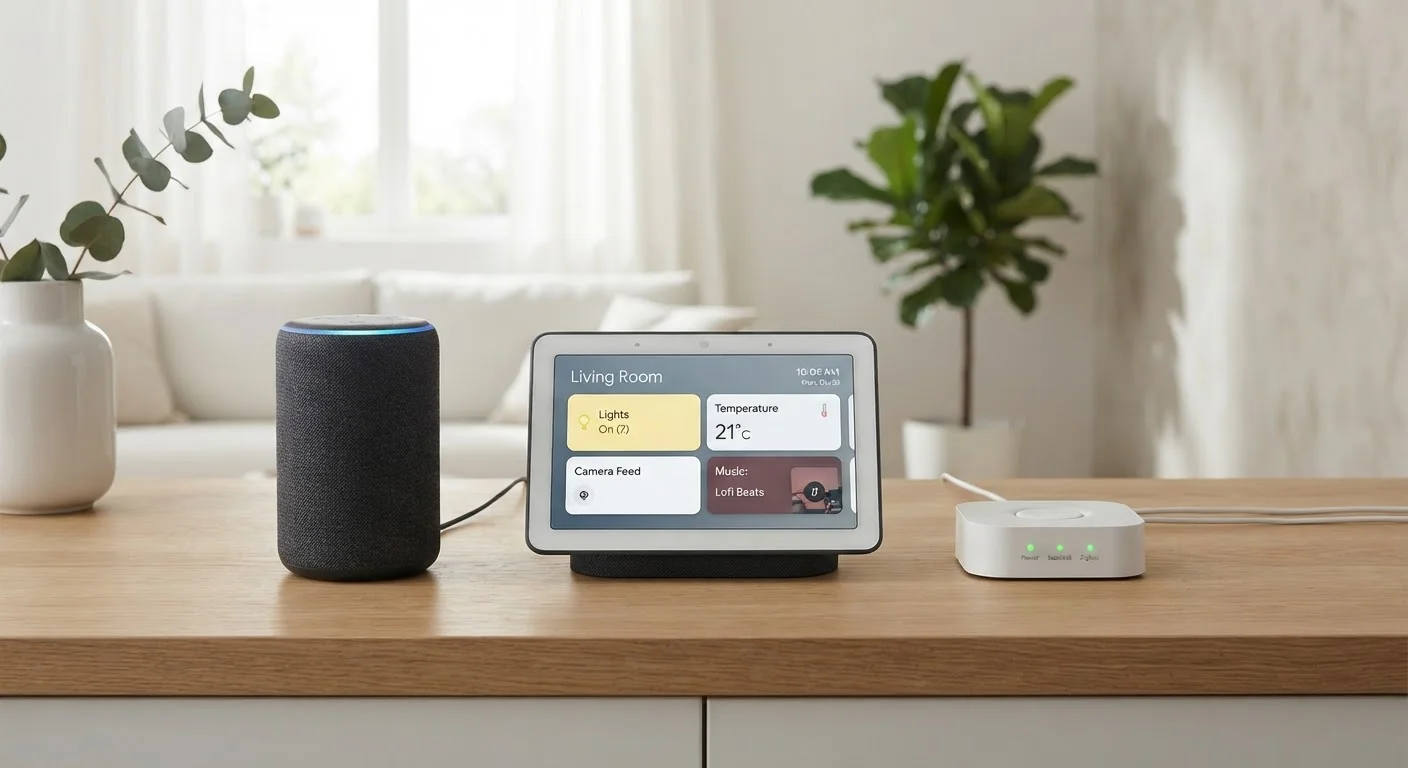
Photo credit: TurboBlogs.net | Explore Blogs At Turbo Speed
In this article
Not all voice-assistant devices do the same job. Here's how smart speakers, smart displays, and smart hubs each fit into a connected home.
Key Takeaways
- Smart speakers handle voice commands and audio but lack a screen for visual feedback.
- Smart displays add a touchscreen to speaker capabilities, enabling video calls, visual controls, and media playback.
- Smart hubs are the backbone of device coordination — they translate protocols so different gadgets can communicate.
- Many modern devices blend these roles, but understanding core functions prevents purchasing the wrong device.
- Your choice should be driven by which room you're in, what you want to control, and which ecosystem your devices use.
Three Devices, Three Jobs
Walk into any electronics section and you'll see smart speakers, smart displays, and smart hubs clustered together as if they're interchangeable. They're not. Each device type grew out of a specific need, and confusing them is one of the most common early mistakes people make when building a connected home. If you're still working out what a smart home even is, our primer on what a smart home really means is a useful starting point.
At a high level: smart speakers are voice-controlled audio devices. Smart displays add a screen to that voice capability. Smart hubs don't typically interact with you at all — they quietly manage communication between your other devices. Once you understand those three roles, choosing the right hardware becomes considerably simpler.
Smart Speakers: Voice-First, Audio-Focused
A smart speaker combines a microphone array, a voice assistant, and a speaker into a single unit. You speak to it; it responds through audio. Common tasks include playing music, setting timers, checking the weather, controlling smart lights, or answering general questions — all without touching anything.
What a smart speaker cannot do is show you anything. There's no screen to display a recipe, confirm who's at the front door, or show a calendar. If visual feedback matters to you in a given room, a smart speaker alone will feel limited. In rooms where audio is the priority — a kitchen where your hands are occupied, or a bedroom — a speaker's compact, screenless form is often the better fit.
Match the device to the room's primary use
Before choosing between a speaker and a display, think about how you'll most often use it in that specific room. A display's screen adds real value in spaces where you cook, monitor the front door, or video call — but in a bedroom, the same screen can be a distraction. Let use case drive the decision, not feature lists.
Smart speakers also vary in sound quality, microphone range, and which voice assistant they use. Those factors influence how well the device integrates with your existing gadgets more than raw audio specs do.
Smart Displays: A Screen Changes Everything
A smart display is essentially a smart speaker with a touchscreen bolted on. That addition opens up capabilities that audio alone can't match: video calling, step-by-step recipe views, security camera feeds, visual smart home dashboards, and streaming video. In a kitchen or living room where both voice and visual interaction make sense, a display covers far more ground.
The trade-off is size and placement. Displays are larger and designed to sit in a fixed spot. They also cost more than comparable speakers. If you want a central panel for your home's daily activity — schedules, communication, device control — a display earns its footprint. For a bedroom nightstand or a small office, the added screen may be more than you need.
| Smart Speaker | Smart Display | Smart Hub | |
|---|---|---|---|
| Primary function | Voice control and audio playback | Voice, audio, and visual interaction | Device coordination and protocol translation |
| Has a screen | No | Yes — touchscreen | No (typically) |
| Voice assistant built in | Yes | Yes | Usually no |
| Controls other smart devices | Yes, via Wi-Fi/cloud | Yes, via Wi-Fi/cloud | Yes, including Zigbee and Z-Wave |
| Best placement | Bedroom, kitchen, office | Kitchen, living room, entryway | Closet, utility area — out of sight |
| Works without internet | Limited | Limited | Often yes, for local automation |
| Typical complexity to set up | Low | Low to medium | Medium to high |
Smart Hubs: The Coordinator Behind the Scenes
A smart hub doesn't listen to your voice or play music. Its job is coordination: it receives signals from your smart devices and translates them into a common language so incompatible gadgets can work together. This becomes critical when you mix devices that use different wireless protocols — Zigbee, Z-Wave, Thread, and Wi-Fi all have distinct communication standards, and many devices only speak one of them natively.
Without a hub, a Z-Wave door lock and a Zigbee motion sensor may never know the other exists. A hub bridges that gap. For a deeper look at how these protocols shape what's possible, see our breakdown of smart home ecosystems and wireless protocols.
Modern hubs increasingly support the Matter standard, which aims to make cross-brand compatibility less dependent on a hub altogether — though hubs still add reliability and local processing that cloud-dependent setups can't always guarantee.
Overlap, Hybrids, and What to Actually Buy
The lines between these categories blur in practice. Several smart displays now include hub radios, allowing them to coordinate Zigbee or Thread devices directly. Some smart speakers include limited hub functions. The result is that a single device can fill two roles — which is useful if you're budget-conscious or minimizing clutter, but only if the combined device does both jobs well enough for your setup.
Before buying, ask three questions: What devices do I already own or plan to add? Which voice assistant ecosystem am I building around? And how central is a screen to how I'll interact with this device daily? Those answers will narrow your options more reliably than any spec sheet.
It's also worth thinking about privacy. Smart speakers and displays are always-listening devices by design, and the data they collect deserves scrutiny. Our guide to smart home data collection walks through what these devices typically gather and how to limit it. Similarly, common myths about smart home technology addresses concerns like always-on listening in practical terms.
35%
U.S. adults owning a smart speaker
Pew Research Center data indicates roughly a third of American adults own a smart speaker, making it the most widely adopted connected home device.
3+
Wireless protocols in a typical multi-device home
Homes that mix lighting, locks, sensors, and thermostats from different manufacturers commonly span three or more communication protocols, underlining the coordination role of a hub.

Author
Tech & Electronics Editorial Team
Tech & Electronics Editorial Team is the collective byline for our editorial team and contributor network. Articles published under this byline or an editorial pen name are researched, written, and reviewed according to our editorial standards for clarity, consistency, and independence before publication.
View all articles →